

Forms overview
Introduction
Section titled “Introduction”A form is how Orbit collects and validates user input in an admin panel — create a post, edit a profile, configure settings. In Python you declare fields with a fluent API; Conduit hosts turn that config into HTML and post state back. Think of the form as the writable counterpart to an infolist: same nesting fabric, different job.
A Form is a Schema specialized for input: compose with .schema([...]), hydrate with .fill(...), collect values with .dehydrate(), and check rules with .validate(...). Your Python config owns chrome, visibility, and dehydration — the host only renders and posts state. On a resource, wire form() once and create / edit pages reuse it; you can also embed a standalone Form on a custom page.
Use .operation("create" | "edit" | "view") so .disabled_on / .hidden_on / .visible_on can branch without bespoke callables. Nest fields in Sections, Tabs, Grids, and Wizards when a flat list of fields is not enough.
from almasix.orbit.forms import Form, TextInput, Select, Togglefrom almasix.orbit.schemas import Section
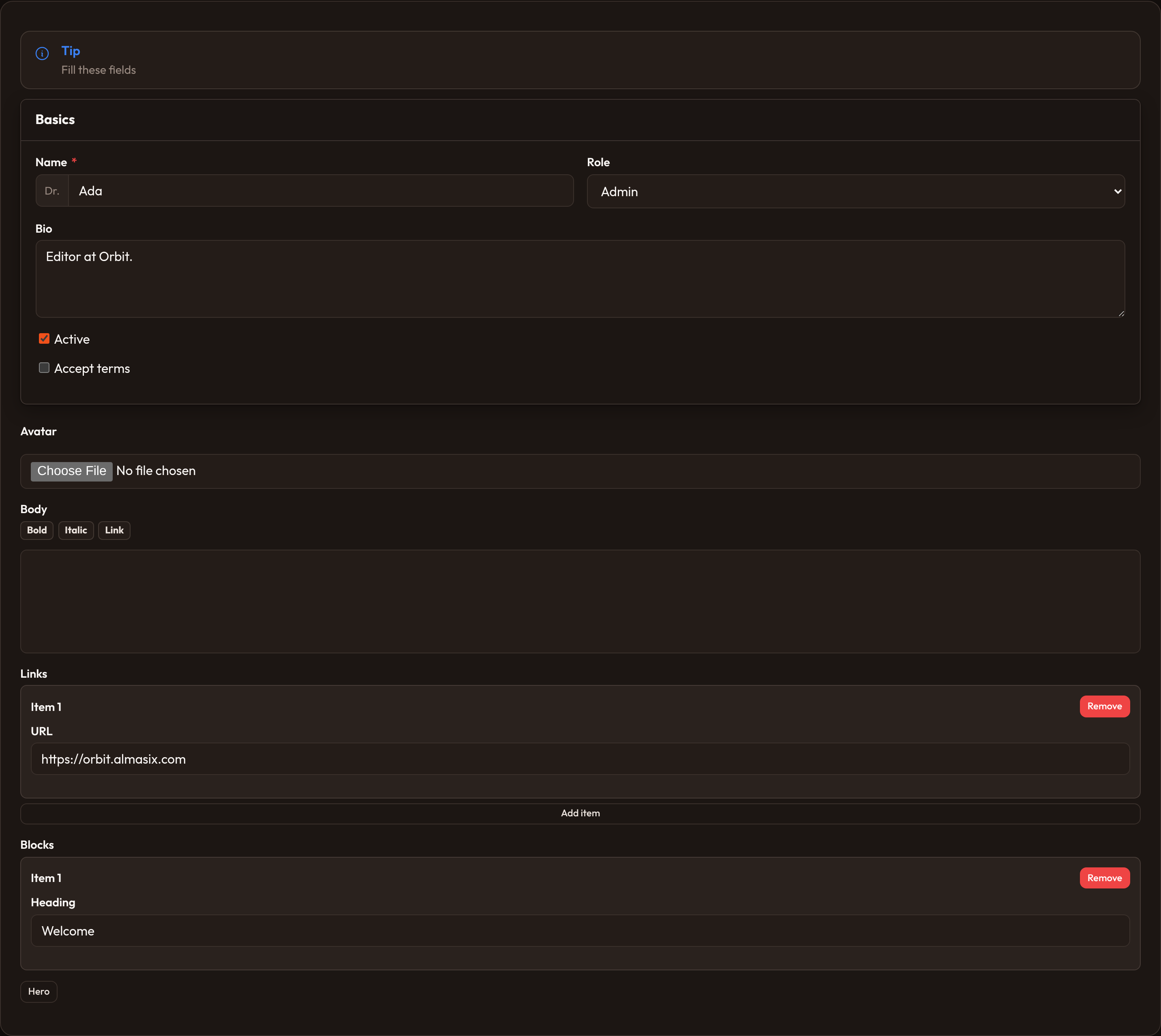
Form.make("post")    .operation("create")    .schema([        Section.make("basics").heading("Basics").schema([            TextInput.make("title").required().max_length(200),            Select.make("status").options({"draft": "Draft", "published": "Published"}),            Toggle.make("featured").label("Featured"),        ]),    ])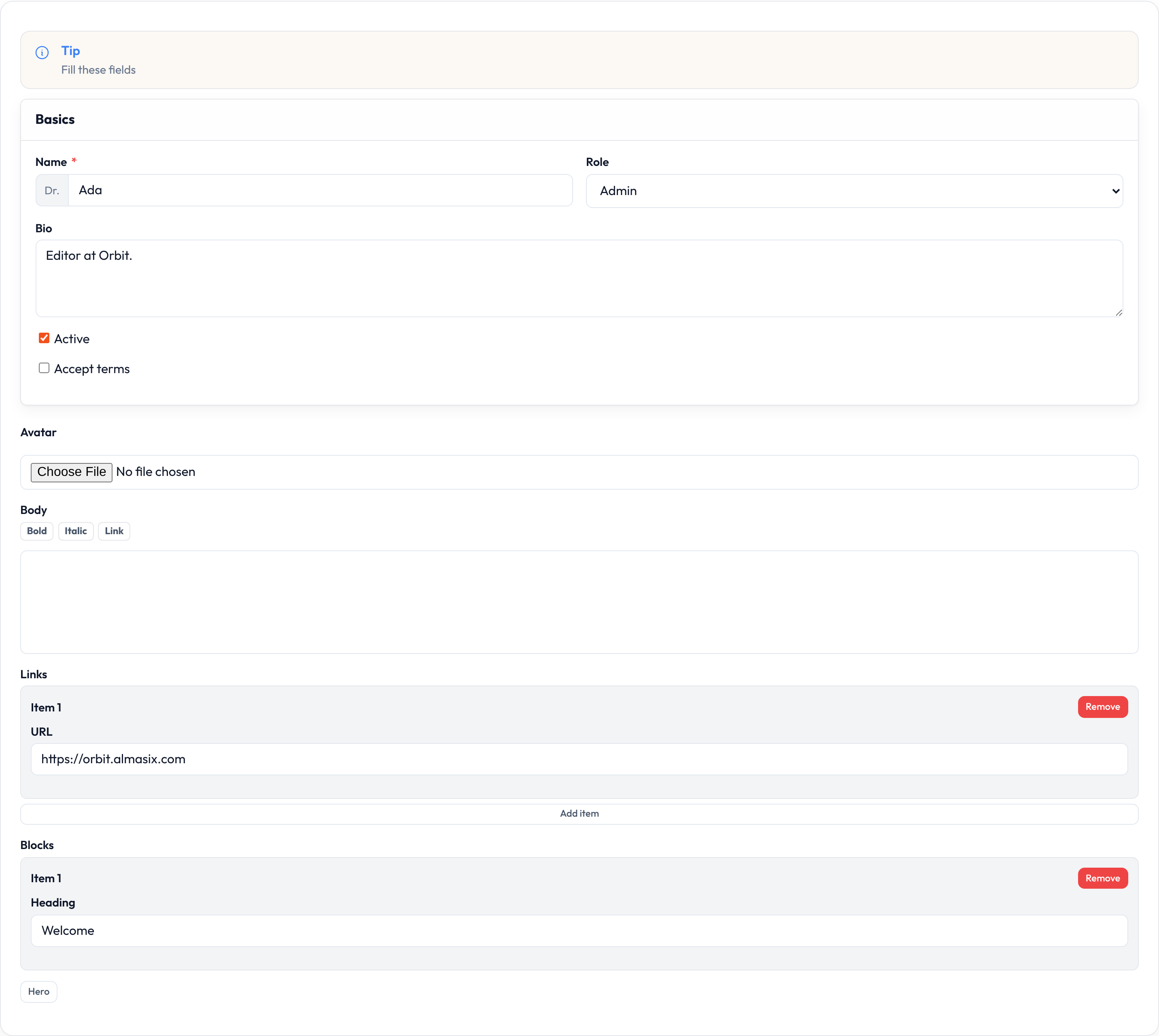
Form fields
Section titled “Form fields”Every editable control is a field under almasix.orbit.forms, nested in a Form or layout schema. Fields share chrome (label, hint, helper, affixes, asterisks) and dehydrate into a dict keyed by state path. Pick the field that matches the data type; compose several inside layouts when the page needs structure.
| Field | Use when |
|---|---|
| Text input | Single-line strings, email, password, URL, numeric |
| Textarea | Multi-line plain text |
| Select / Multi select | Fixed or relationship option lists |
| Checkbox / Toggle | Booleans |
| Checkbox list / Radio | Enumerated choices |
| Date / Date-time / Time | Temporal values |
| File upload | Files and images |
| Rich editor / Markdown editor | Long-form body copy |
| Repeater / Builder | Nested lists / block editors |
| Tags / Key-value / Color / Slider / Money | Tags, maps, color, range, currency |
| Toggle buttons / OTP / Code / Hidden | Segmented, OTP, source, opaque |
| Placeholder / View field | Read-only / custom view chrome |
| Morph-to / Table select / Modal table select | Polymorphic / table-backed picks |
| Custom fields | Your own field subclass |
from almasix.orbit.forms import TextInput, Select, Toggle
TextInput.make("name").required()Select.make("role").options({"editor": "Editor", "admin": "Admin"})Toggle.make("active").default(True)
Validating fields
Section titled “Validating fields”Validation is fluent on the field. Helpers like .required(), .email(), .max_length(255), .required_if(...), and .prohibited_if(...) attach rules that Form.validate(data) walks through nested layouts — early host feedback plus IDE autocomplete. Prefer dedicated helpers over raw .rules(...) when a method exists; see Validation.
.mark_as_required() controls the asterisk independently of the required rule (hide it on all-required forms, or show it without enforcing presence).
from almasix.orbit.forms import Form, TextInput
form = Form.make("signup").schema([    TextInput.make("email").required().email().unique("users", "email"),    TextInput.make("password").required().confirmed().min_length(8),    TextInput.make("password_confirmation").required(),    TextInput.make("role").default("user"),    TextInput.make("admin_code").required_if("role", "admin"),])errors = form.validate({"email": "a", "password": "x", "password_confirmation": "y", "role": "admin"})

Setting a field’s label
Section titled “Setting a field’s label”By default Orbit derives the label from the field name (first_name → First Name). Override with .label(...) when UI copy should differ from the state key. Labels feed validation messages unless you set .validation_attribute(...). Callables get injected utilities such as record and operation — see Closures.
from almasix.orbit.forms import TextInput
TextInput.make("name")    .label("Full name")    .helper_text("Shown on invoices and the public profile.")    .hint("Legal name")    .hint_icon("heroicon-m-information-circle")

Hiding a field’s label
Section titled “Hiding a field’s label”Some controls already communicate their purpose (search with a placeholder, icon-only toggles). .hidden_label() keeps an accessible name while omitting the visible label row.
from almasix.orbit.forms import TextInput
TextInput.make("q")    .hidden_label()    .placeholder("Search posts…")    .autofocus()

Setting the default value of a field
Section titled “Setting the default value of a field”Defaults apply when the schema hydrates with no existing value for that path — typically create pages, not edit pages that .fill(record). Use .default(...) for starting points; pass a callable when the value depends on tenant, user, or request context (same utility injection as labels).
from almasix.orbit.forms import TextInput, Select, Toggle
TextInput.make("locale").default("en")Select.make("status").options({    "draft": "Draft",    "published": "Published",}).default("draft")Toggle.make("notify").default(lambda user=None, **_: bool(getattr(user, "wants_alerts", False)))

Disabling a field
Section titled “Disabling a field”Disabled fields stay visible but reject input. Use .disabled() or a callable for auth-gated locks. Values still dehydrate by default — call .dehydrated(False) (alias .saved(False)) when the host must omit the path from the save payload.
from almasix.orbit.forms import TextInput
TextInput.make("slug")    .disabled(lambda operation=None, **_: operation == "edit")    .dehydrated(True)
TextInput.make("computed_score")    .disabled()    .saved(False)

Disabling a field based on the current operation
Section titled “Disabling a field based on the current operation”.disabled_on("edit") (or multiple operations) is the concise alternative when the only axis is create / edit / view. Set .operation(...) on the form or pass operation= into render/validate context.
from almasix.orbit.forms import Form, TextInput
Form.make("coupon")    .operation("edit")    .schema([        TextInput.make("code").disabled_on("edit"),        TextInput.make("label").required(),    ])

Hiding a field
Section titled “Hiding a field”.hidden() / .visible(...) accept booleans or callables; invisible fields skip validation and rendering. Prefer callables when visibility depends on sibling state or auth — pair with .live() on the driver field so the host re-renders after changes.
from almasix.orbit.forms import Select, TextInput
Select.make("status")    .options({"draft": "Draft", "published": "Published"})    .live()TextInput.make("published_at")    .visible(lambda state=None, **_: (state or {}).get("status") == "published")
Hiding a field based on the current operation
Section titled “Hiding a field based on the current operation”.hidden_on("create") removes the field for listed operations; .visible_on("edit") is an allow-list — the field only appears for those operations.
from almasix.orbit.forms import TextInput
TextInput.make("created_by").hidden_on("create")TextInput.make("migration_token").visible_on("create")
Inline labels
Section titled “Inline labels”Inline labels sit beside the control instead of above it — useful in dense settings rows. Toggle and checkbox fields often combine .inline_label() with .inline() so the label and control share one horizontal row.
from almasix.orbit.forms import TextInput, Toggle
TextInput.make("timezone").inline_label().placeholder("UTC")Toggle.make("marketing_emails").label("Marketing emails").inline_label()

Autofocusing a field when the schema is loaded
Section titled “Autofocusing a field when the schema is loaded”.autofocus() marks the primary entry point so keyboard users land in the right control after navigation. Prefer a single autofocused field per form — browsers only honor one.
from almasix.orbit.forms import TextInput, Textarea
TextInput.make("title").autofocus().required()Textarea.make("body").rows(8)

Setting the placeholder of a field
Section titled “Setting the placeholder of a field”Placeholders hint at expected format without replacing labels. Keep them short (you@acme.test); put durable instructions in .helper_text(...) so they remain after typing. Callables work for locale/tenant-aware hints.
from almasix.orbit.forms import TextInput
TextInput.make("email")    .email()    .placeholder("you@acme.test")    .helper_text("We never share this address.")

Adding extra content to a field
Section titled “Adding extra content to a field”Content slots inject copy around the label and control without subclassing: above_label, below_label, before_label, after_label, above_content, below_content, before_content, after_content, and below_error (string or callable). Affixes (.prefix / .suffix, plus icons and colors) sit inside the control chrome — complementary to the outer slots.
from almasix.orbit.forms import TextInput
TextInput.make("title")    .above_label("Public listing")    .below_label("Keep it under 60 characters for search results.")    .after_content("Visible on the storefront.")    .below_error("Fix the title, then save again.")TextInput.make("price").numeric().prefix("$").suffix("USD").prefix_icon("heroicon-m-banknotes").prefix_icon_color("success")



Adding extra HTML attributes to a field
Section titled “Adding extra HTML attributes to a field”.extra_input_attributes({...}) merges onto the control, .extra_field_wrapper_attributes({...}) onto the field wrapper, and .extra_attributes({...}) onto the root node. Prefer first-class fluent APIs when one exists; use data attributes for Conduit hooks.
from almasix.orbit.forms import TextInput
TextInput.make("title")    .extra_input_attributes({"data-testid": "post-title", "spellcheck": "true"})    .extra_field_wrapper_attributes({"data-tour": "title-field"})

Field utility injection
Section titled “Field utility injection”When a fluent helper accepts a callable, Orbit’s evaluate() injects only the kwargs the callable declares — same model as Closures and Support closures. Common utilities: state, record, operation, value, and field / component. Resource pages pass auth/tenant into render() / validate().
from almasix.orbit.forms import TextInput, Select
TextInput.make("publisher")    .visible(lambda operation=None, **_: operation == "edit")    .label(lambda record=None, **_: f"Publisher ({(record or {}).get('id', 'new')})")
Select.make("assignee_id")    .options(lambda **ctx: ctx.get("assignees", {}))    .disabled(lambda user=None, **_: not getattr(user, "is_manager", False))
The basics of reactivity
Section titled “The basics of reactivity”.live() syncs on every change so dependent visibility/options can re-run without a full submit. Use .live(on_blur=True) for blur-only updates, or .live(debounce=500) to throttle keystrokes. Mark the driver field live; dependents read sibling state via injected state.
from almasix.orbit.forms import TextInput
TextInput.make("title").live(debounce=300)TextInput.make("slug")    .disabled(lambda state=None, **_: bool((state or {}).get("slug_locked")))

Field lifecycle
Section titled “Field lifecycle”Fields hydrate from .fill(...) / defaults, react via .after_state_updated(...) / .after_state_updated_js(...), then dehydrate into the save dict. .dehydrate_state_using(...) mutates the outgoing value; .trim() and .strip_characters(...) clean whitespace/punctuation on dehydrate.
from almasix.orbit.forms import Form, TextInput
form = Form.make("account").schema([    TextInput.make("email").email().trim().dehydrate_state_using(        lambda state, **_: str(state).lower() if state else state    ),    TextInput.make("phone").tel().strip_characters([" ", "-", "(", ")"]),])form.fill({"email": "  Ada@Example.COM  ", "phone": "(555) 010-0200"})payload = form.dehydrate()
Saving data to relationships
Section titled “Saving data to relationships”Orbit does not auto-save arbitrary relationship graphs. Helpers today focus on options and nested state:
Select.relationship(...)loads options (optional AJAX search); dehydrated value is typically a foreign key.Repeater.relationship(...)/ relationship repeater binds nested rows, with optionalmutate_relationship_data_before_*hooks.
Your resource/page host still owns persisting the dehydrated dict (and related rows).
from almasix.orbit.forms import Select, Repeater, TextInput
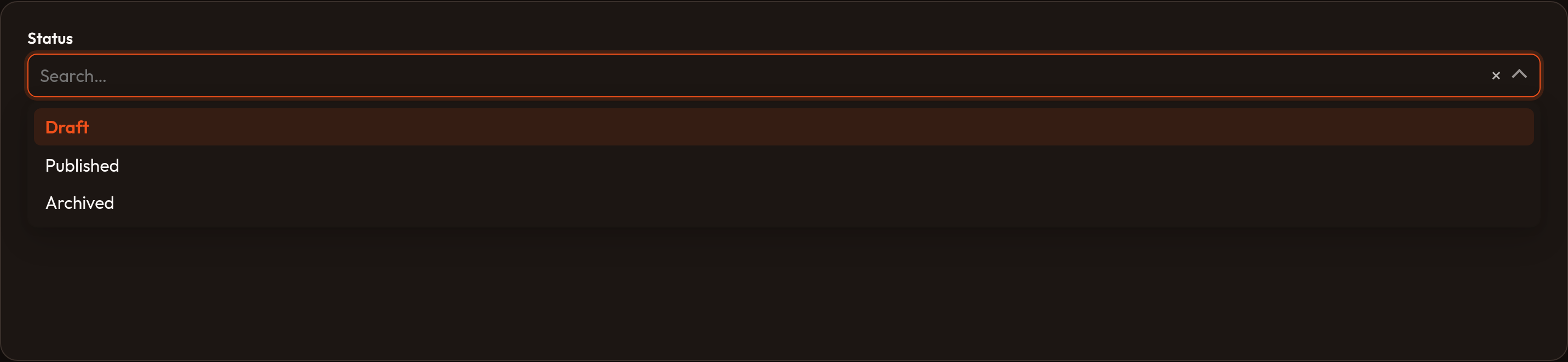
Select.make("artist_id").relationship("artist", "name", preload=True).searchable()Repeater.make("tracks").relationship("tracks").schema([    TextInput.make("title").required(),    TextInput.make("duration").numeric(),])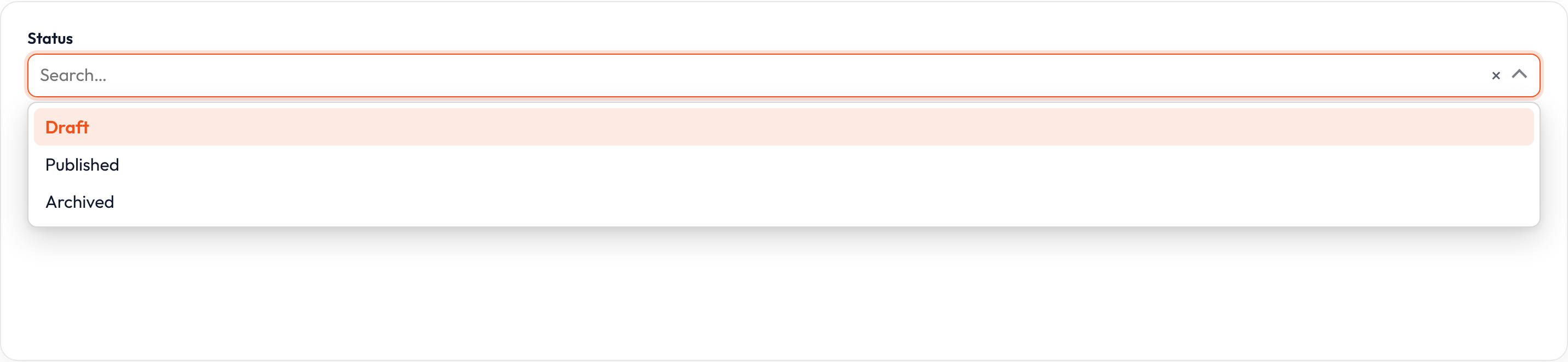
Global settings
Section titled “Global settings”Form subclasses Schema, so panel-wide defaults go through Schema.configure_using(...) in a provider boot hook. Callbacks run inside make(...) before your local chain (per-form calls still win). Use this for columns/wrappers; configure individual fields in app factories (no field-level configure_using yet).
from almasix.orbit.schemas import Schemafrom almasix.orbit.forms import Form
Schema.configure_using(lambda schema: schema.columns(1))Form.make("settings").schema([...])
Field catalog
Section titled “Field catalog”Quick map from concern → fluent surface on the shared Field / Form API. Deep dives and variation screenshots live on each field page; use this table when you need the method name, not the full recipe.
| Concern | Orbit API |
|---|---|
| Compose / hydrate | Form.make, .schema, .fill, .dehydrate, .operation, .validate |
| Label chrome | .label, .hidden_label, .inline_label, .helper_text, .hint, .hint_icon |
| Affixes / slots | .prefix / .suffix (+ icons/colors), content slot helpers |
| State / visibility | .default, .placeholder, .autofocus, .disabled / .disabled_on, .hidden / .visible / _on |
| Persistence | .dehydrated / .saved, .dehydrate_state_using, .trim, .strip_characters |
| Reactivity | .live, .after_state_updated, .after_state_updated_js |
| Validation / closures | Validation, Closures |
| Relationships | Select.relationship, Repeater.relationship (+ mutate hooks) |
from almasix.orbit.forms import TextInput
TextInput.make("title")    .label("Title").placeholder("Enter a title…")    .helper_text("Used in lists and SEO.")    .required().mark_as_required().trim().live(debounce=300)    .extra_input_attributes({"autocomplete": "off"})