

Orbit Workflows
Versioned workflows for forms, approvals, parallel branches, escalation, and signatures.
pip install almasix-orbit-workflows- Installs—
- Stars1
- Author
- Almasix
- Orbit versions
- 0.5
- Package
- almasix-orbit-workflows
- License
- MIT
- Python
- >=3.11
- Listed
- September 30, 2026
What it does
WorkflowPlugin adds an inbox, a case timeline, and a canvas designer.
A published document is the contract: statuses, steps, assignees, and a
full Orbit form. A case pins that version, so a later edit does not move
work already in flight.
Steps can be a form, an approval, a signature, a route, a notice, a fork, or a join. Assignees are people, a role, the starter, an earlier answer, or a guest link. An edge can call your code (and refuse) or start another workflow.
Install
pip install almasix-orbit-workflowsfrom almasix_orbit_workflows import WorkflowPlugin
panel.plugin(WorkflowPlugin.make())Full README: almasix-orbit-workflows.
Documentation
View sourcealmasix-orbit-workflows





Versioned workflows for Orbit panels. A published document is the contract: the statuses, the steps, who must act, and the form on each step. A case follows one version of that document until it finishes. Editing the document later does not move a case that has already started.
Register the plugin on a panel. Orbit never auto-discovers plugins.
Install
pip install almasix-orbit-workflowsfrom almasix.orbit import Panel, PanelRegistry
from almasix_orbit_workflows import Directory, WorkflowEngine, WorkflowPlugin
def register_admin_panel(registry: PanelRegistry) -> Panel:
engine = WorkflowEngine(directory=Directory([
{"id": "sam", "name": "Sam", "roles": ["sales"], "manager_id": "jordan"},
{"id": "jordan", "name": "Jordan", "roles": ["legal"]},
{"id": "ava", "name": "Ava", "roles": ["finance"]},
]))
panel = (
Panel.make("admin")
.path("admin")
.plugin(WorkflowPlugin.make(engine))
)
registry.register(panel)
return panelThe plugin adds three pages under Workflows:
- Inbox — open tasks for the signed-in person
- Cases — the timeline, open tokens, and signatures for one case
- Designer — the document as a canvas of steps and edges
Visual design
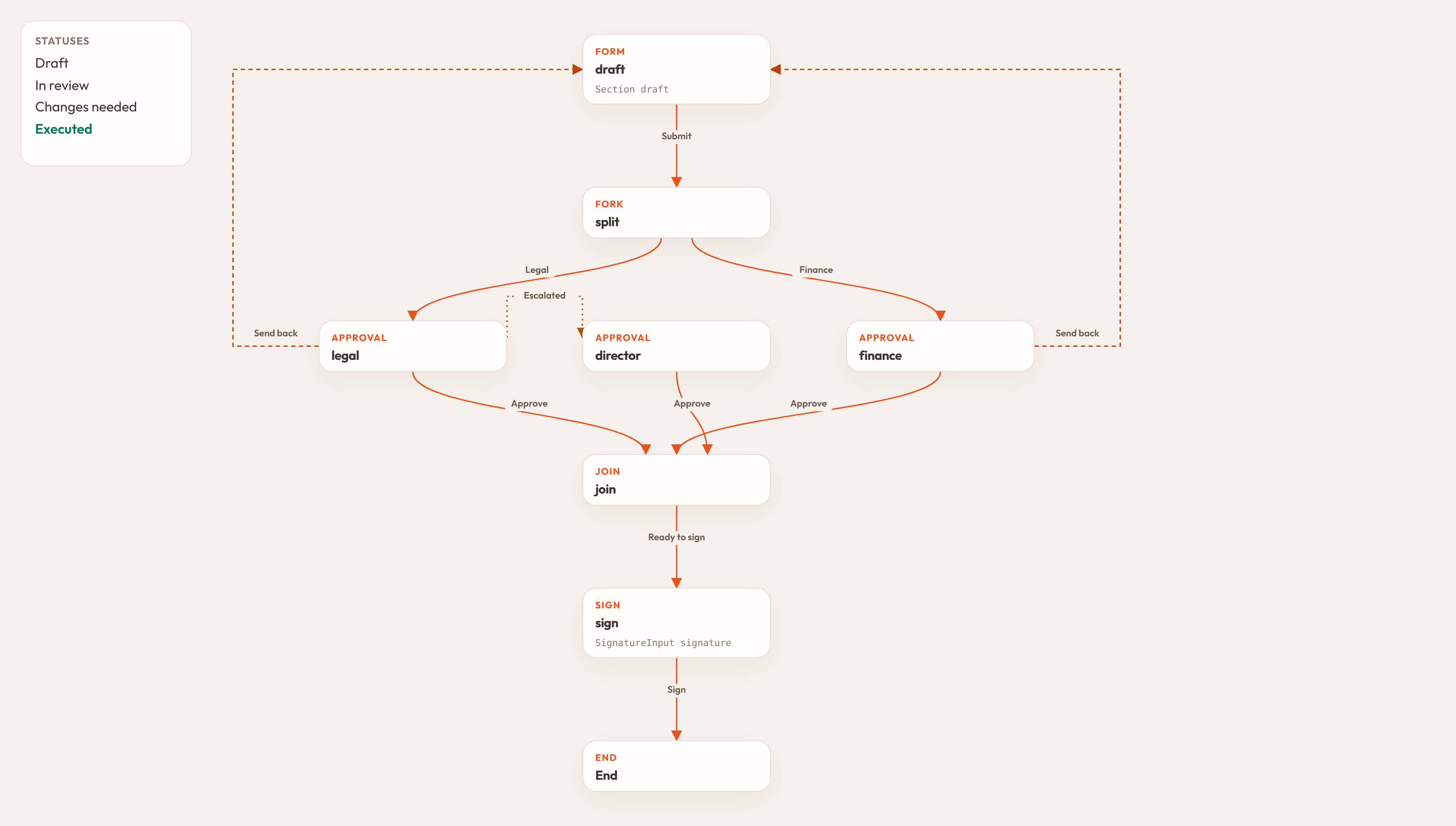
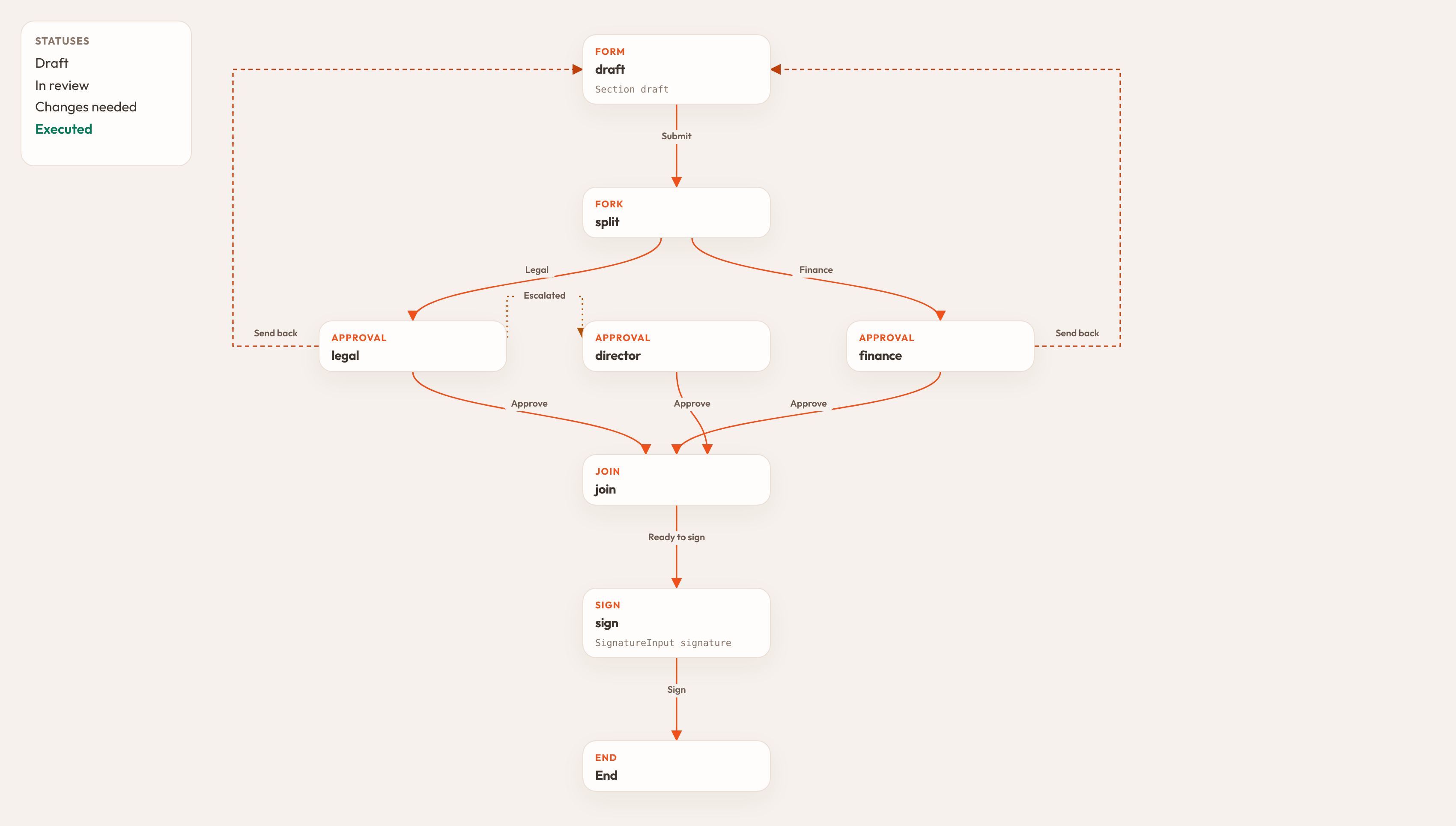
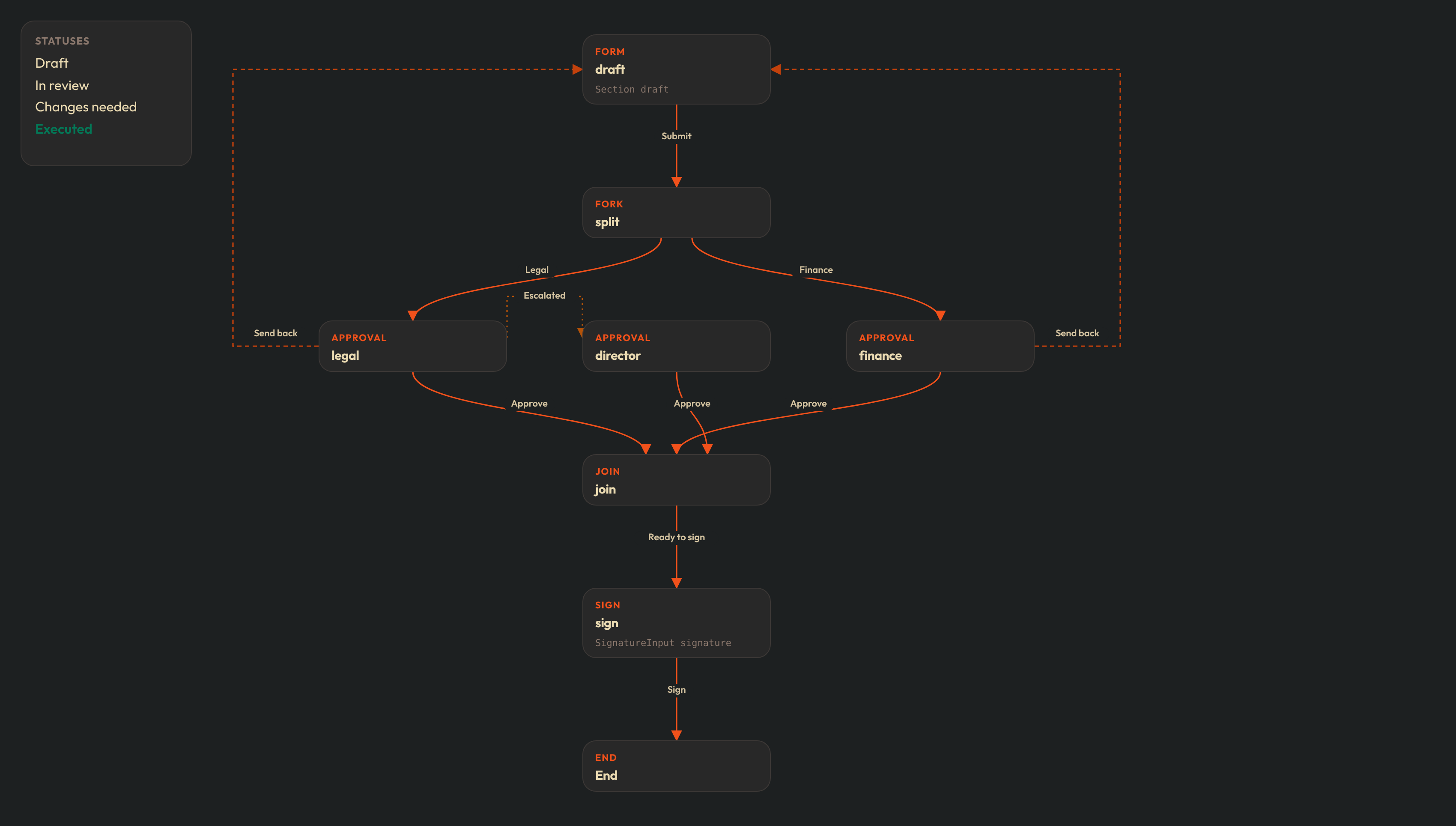
The canvas is the document: statuses on the side, each step a card, and an arrow for every transition.
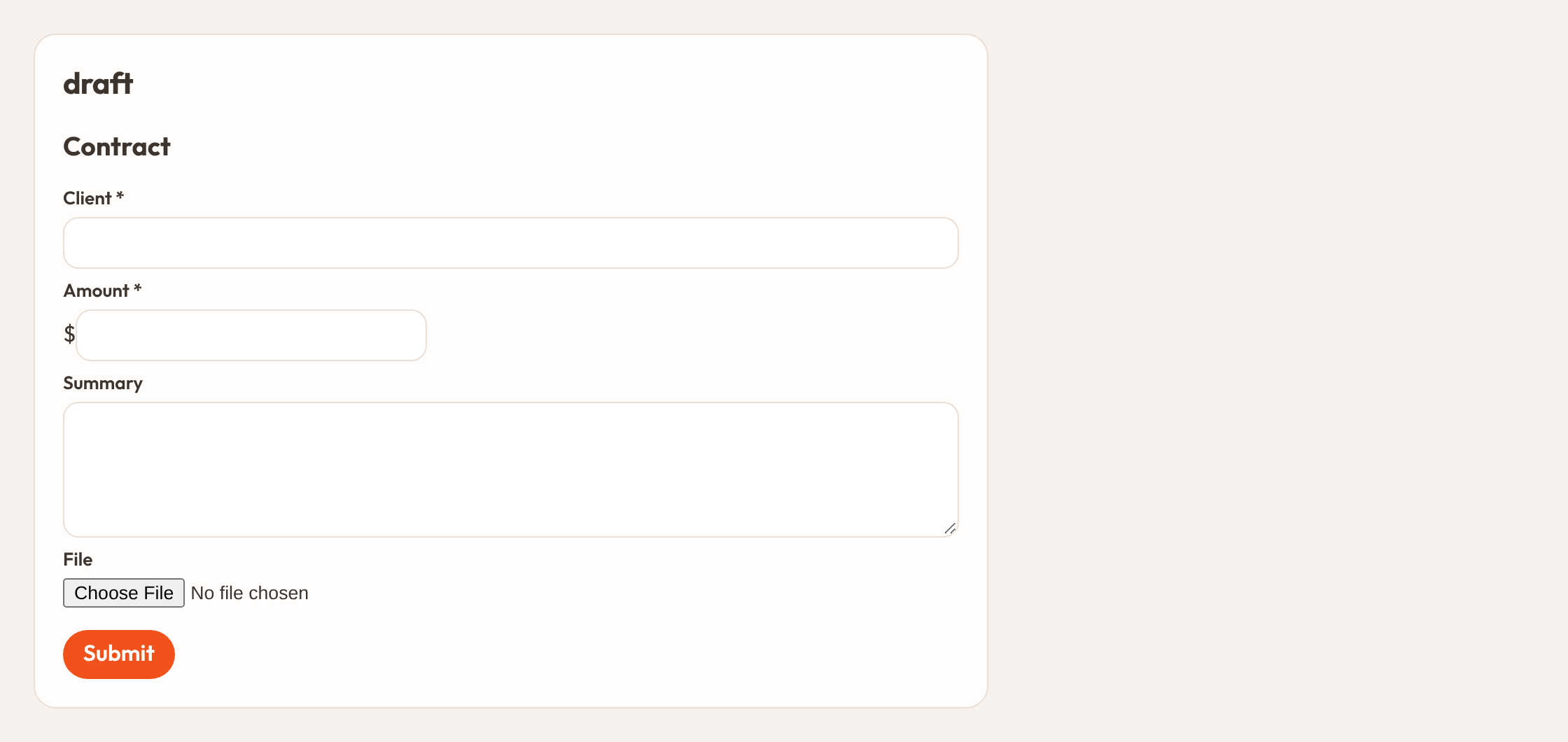
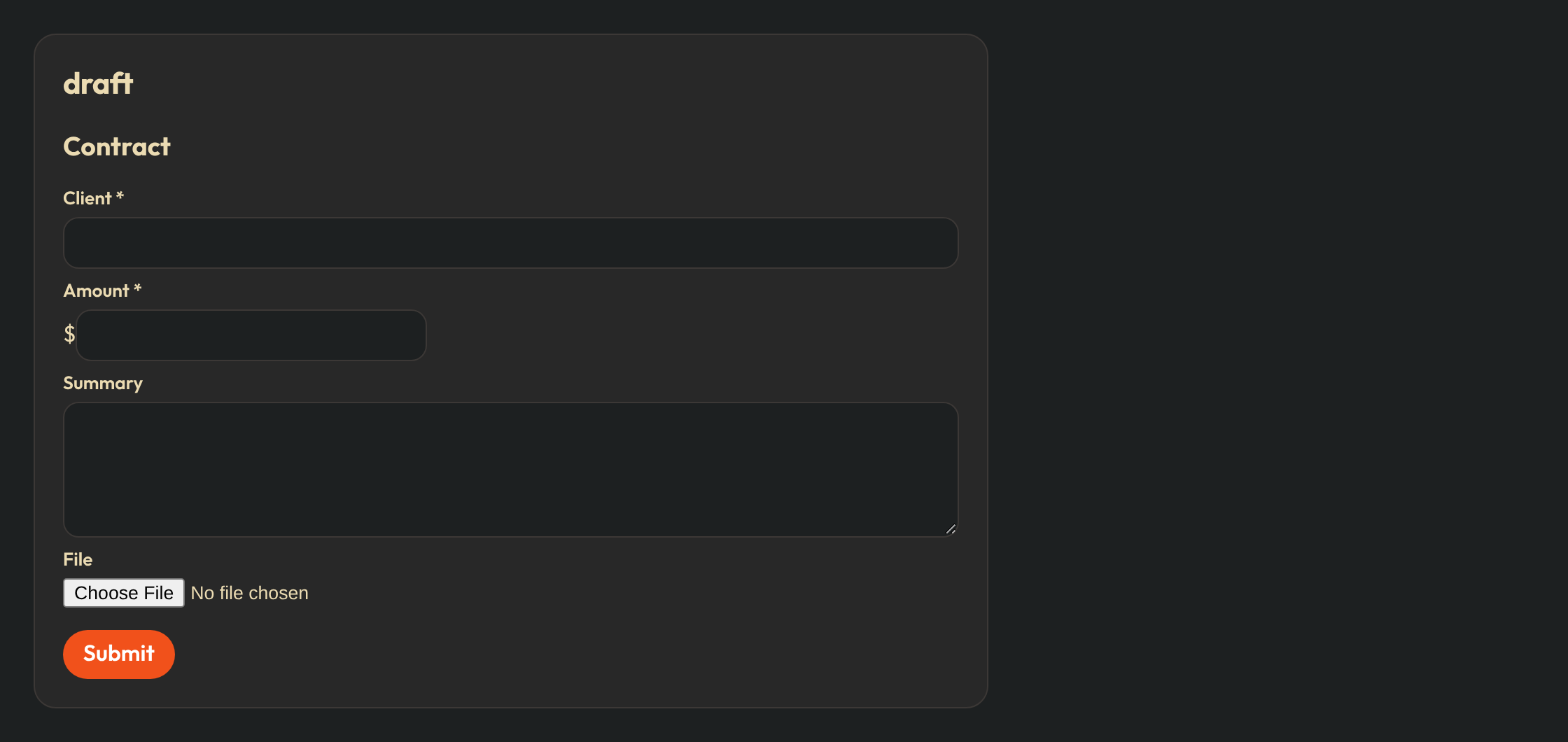
The draft step is an Orbit form. Submit is the edge label.
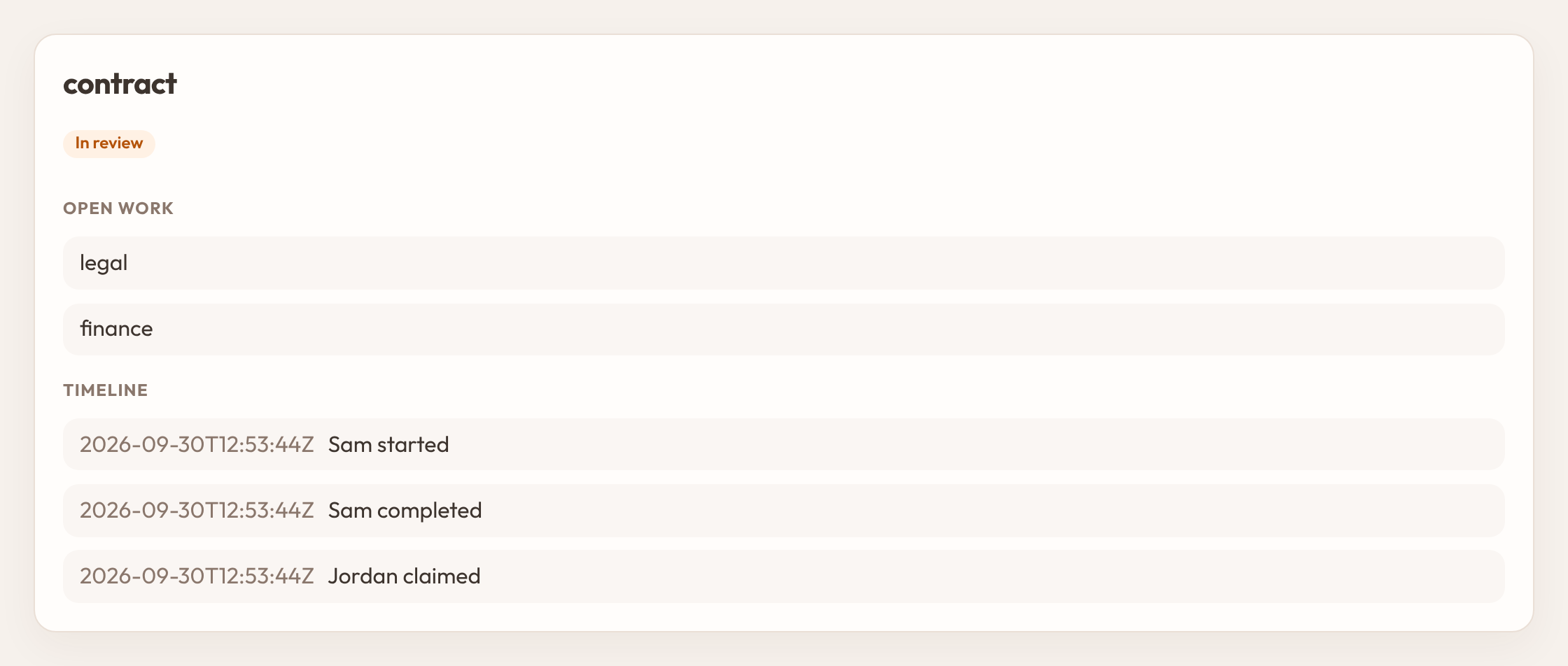
The inbox shows the document’s status color. Claiming a role task puts your name on the row.


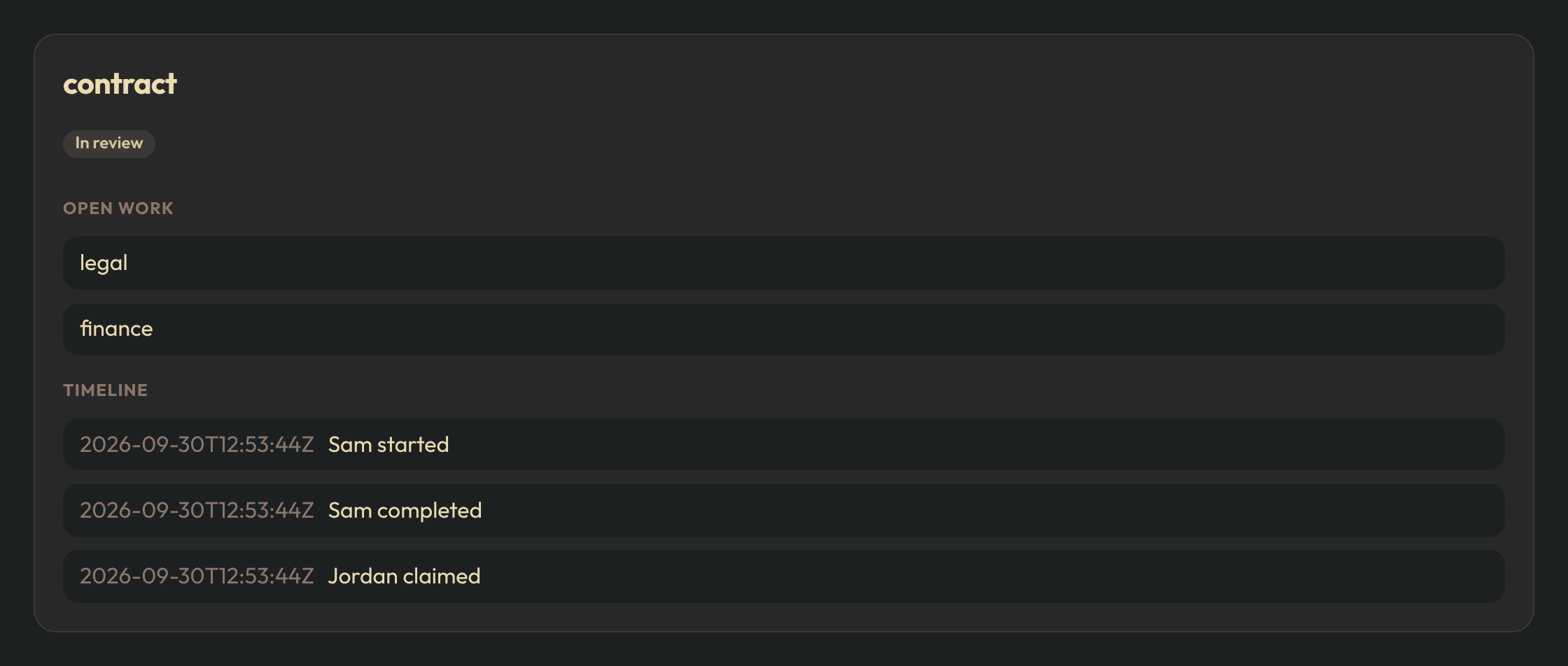
A case keeps the timeline and only the tokens still open.
Directory is your panel’s users and roles. Each record needs id. Optional fields are name, roles (a list of role names), and manager_id.
A contract, from draft to signature
Statuses belong to this document. Another workflow can use different words.
from almasix_orbit_workflows import Person, Step, Workflow, role, starter

contract = (
    Workflow.make("contract")
    .titled("Contract")
    .zone("Africa/Nairobi")
    .status("draft", "Draft")
    .status("review", "In review", color="warning")
    .status("changes", "Changes needed", color="danger")
    .status("executed", "Executed", color="success", terminal=True)
    .step(
        Step.make("draft", "form")
        .assignee(starter())
        .schema([
            {
                "type": "Section",
                "name": "details",
                "heading": "Contract",
                "schema": [
                    {"type": "TextInput", "name": "client", "label": "Client", "required": True},
                    {"type": "MoneyInput", "name": "amount", "label": "Amount", "required": True},
                    {
                        "type": "Grid",
                        "name": "split",
                        "columns": 2,
                        "schema": [
                            {"type": "Textarea", "name": "summary", "label": "Summary"},
                            {"type": "FileUpload", "name": "pdf", "label": "File"},
                        ],
                    },
                ],
            },
        ])
        .on("submit", to="legal", status="review", label="Submit")
    )
    .step(
        Step.make("legal", "approval")
        .assignee(role("legal"))
        .remind("1d")
        .escalate(after="2d", to="director", status="review", label="Escalated")
        .on("approve", to="end", status="executed", label="Approve")
        .on("return", to="draft", status="changes", label="Send back")
    )
    .step(
        Step.make("director", "approval")
        .assignee(role("director"))
        .on("approve", to="end", status="executed", label="Approve")
    )
)

engine.save(contract.document())
engine.publish("contract")
publish checks the graph. Every edge must name a status that exists on the document. An edge that ends the case must use a status marked terminal=True. A route needs a default edge with no condition. A step that cannot be reached from the start is rejected.
case = engine.start(
    "contract",
    Person.of("sam", "Sam"),
    subject_type="Contract",
    subject_id="42",
)
task = next(t for t in engine.store.tasks_for(case["id"]) if t["state"] == "open")
case = engine.complete(task["id"], Person.of("sam", "Sam"), "submit", {
    "client": "Acme",
    "amount": "12000",
})
subject_type and subject_id point at your own record. The workflow stores the answers and the status key. Your module keeps the books.
Steps
| Kind | What happens |
|---|---|
form | Someone fills the step’s schema. |
approval | Someone chooses a named outcome. Buttons use the edge labels. |
sign | Same as an approval, and the signing outcomes require a signature. |
route | No task. The first matching condition wins. |
notify | Sends a notice and follows its one edge. |
fork | Opens every outgoing branch at once. |
join | Waits until incoming branches meet all, any, or a quorum, then follows its edge. |
An edge’s branch is finish or abort.
- finish completes that branch and leaves the others running. Use this when IT, finance, and facilities must each clear a staff exit even if one of them records an outstanding item.
- abort cancels the other open tasks in the fork. Use this when one reviewer sends a contract back to draft.
Step.make("legal", "approval").assignee(role("legal")).on(
    "return", to="draft", status="changes", label="Send back", branch="abort",
)
Who must act
Call .assignee() once for each rule. A step may combine them. The people are resolved when the task opens, and stored on the task, so a later role change does not rewrite a task already in someone’s inbox.
| Helper | Assigns |
|---|---|
user("jordan") | That person. |
role("legal") | Anyone who holds the role. |
starter() | The person who opened the case. |
field("manager") | The user id saved in an earlier answer named manager. |
expression("manager_of:starter") | The starter’s manager_id. |
expression("role_except_starter:legal") | The role, excluding the starter. |
guest("ada@example.com", "Ada") | A person with no panel account. They receive a link that opens this step only. The link stops working when the task is finished or reassigned. |
Step.make("offer", "sign").assignee(guest("ada@example.com", "Ada")).signs("sign").on(
    "sign", to="end", status="hired", label="Sign",
)
When several people qualify, .how_many() decides how the step finishes:
any(the default) — one shared task. The first person to claim it holds it. Anyone else in the pool sees who claimed it. One completion moves the case.all— one task per person. Everyone must choose the same outcome.quorum— one task per person. The step moves when that many agree.
If a rule matches nobody, the task stays open and unassigned. Someone who can reassign gives it a person:
engine.reassign(task_id, actor, "jordan")Forms
A step schema is an Orbit form, stored as a tree of components. Layouts nest. Every Orbit input is allowed, including Repeater, FileUpload, relationship selects, and SignatureInput.
visible_when reads answers already on the case:
{"type": "Textarea", "name": "note", "label": "Note", "required": True, "visible_when": 'answers.kind=="extra"'}Route conditions use the same shape, plus named effects:
.on("high", to="finance", status="review", label="Finance", when="answers.amount>=1000")
.on("open", to="end", status="waitlisted", label="Waitlist", when="effect:seats_remaining")
.on("else", to="end", status="registered", label="Register")
engine.save_draft(task_id, actor, payload) stores answers before submit. Submit is engine.complete.
Effects
Register a function under a name. An edge calls it after validation and before the case moves. Raise Refused to leave the task open and show the message. Use this for a budget check, a seat reservation, or a journal posting. The ledger itself stays in your module.
from almasix_orbit_workflows.errors import Refused

def post_journal(answers, context):
    if float(answers["amount"]) > 10000:
        raise Refused("Over the approval limit.")

engine.effects["post_journal"] = post_journal.on("submit", to="legal", status="review", label="Submit", effect="post_journal")The call receives an idempotency_key. A repeated completion of the same task does not call the effect twice.
An edge can also start another published workflow with the same subject:
.on("sign", to="end", status="hired", label="Sign", start_workflow="onboarding")Signatures
Outcomes listed in .signs() require a drawn or typed signature and the signer’s name. The engine stores the image, the name, the statement of intent from .statement(), and a hash of the answers plus any file hashes you pass. Later edits to the subject record do not rewrite that snapshot.
engine.complete(
    task_id,
    actor,
    "sign",
    {"signature": "data:image/png;base64,...", "signer_name": "Sam"},
    files={"pdf": file_hash},
)
file_hash is a sha256 hex digest of the file bytes. Import file_hash from almasix_orbit_workflows.signing or pass a digest you already computed.
Time
.zone() is the timezone used for day-long durations. .escalate(after="2d", to=..., status=..., label=...) follows that edge when the deadline passes and sets the status you named. .remind("1d") notifies the assignees before the deadline and does not change status.
Call engine.promote_due() from a scheduler. Opening the inbox runs the same check, so a waiting person still sees an escalated task if the schedule has not run.
.limit_visits(8, stuck_status="changes") stops a send-back loop. After that many entries into one step, the case moves to stuck_status when you set one.
Case actions
Withdraw and operator moves are edges on the document, so their statuses are not hard-coded:
Workflow.make("contract")
    .case_action("withdraw", status="changes", label="Withdraw", who="starter")
    .case_action("move", status="draft", label="Return to draft", who="role:operate")
who is starter, operate (the person must hold the operate role), or role:<name>.
engine.take_case_action(case_id, actor, "withdraw")Open tasks are cancelled. If the status is terminal, the case closes. The timeline records the action.
engine.comment(case_id, actor, "Holding for legal.") appends a note to that timeline.
Run a document before you publish it
simulate walks a private copy of the engine. Nothing is written to the live store.
engine.simulate(
    contract.document(),
    [
        {"action": "start"},
        {"action": "complete", "outcome": "submit", "payload": {"client": "Acme", "amount": "12000"}},
    ],
    actor=Person.of("sam", "Sam"),
)
engine.retire("contract") keeps open cases on their version and refuses new starts.
Develop
pip install -e '.[dev]'
pytest --cov=almasix_orbit_workflows --cov-fail-under=100
Marketplace listing: orbit.almasix.com/plugins/orbit-workflows.
This plugin is maintained by the Orbit team.
How to install and wire a plugin: Using a plugin. Report security issues on theadvisory form.